
IntelliPay is a PCI DSS Level 1 certified payment processor offering transparent interchange-plus pricing with no hidden fees, serving businesses, government agencies, and professional services firms nationwide since 2004.
Quick Answer
How do you read a merchant statement?
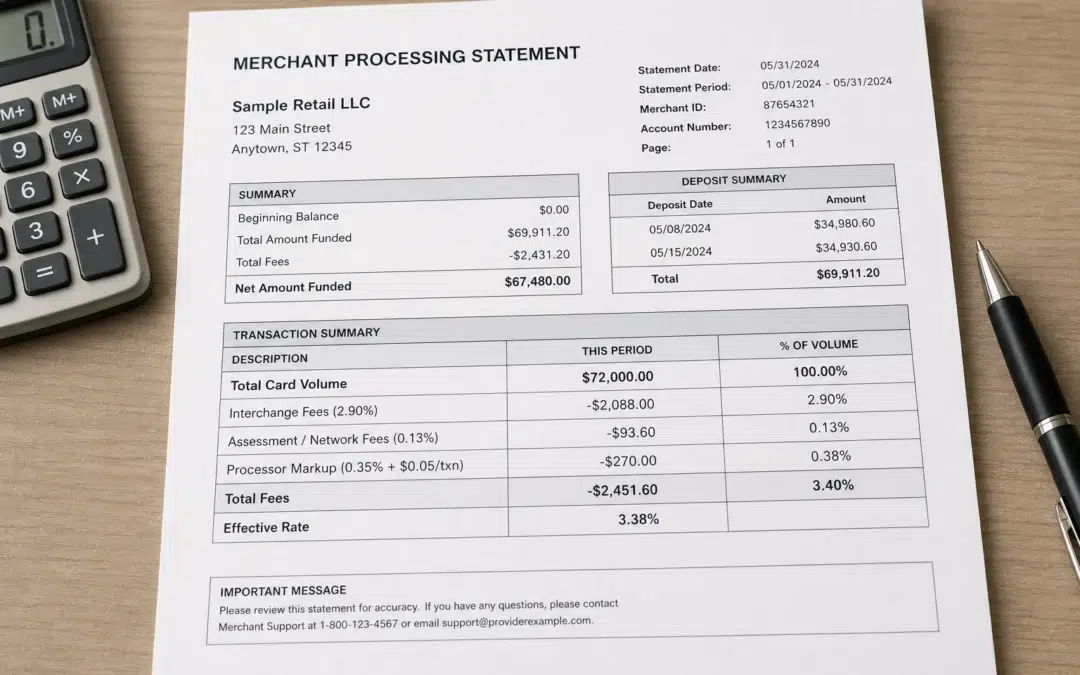
Start by finding your total fees and your total card volume. Divide total fees by total volume and multiply by 100. That is your effective rate. If it is above 3%, you have questions to ask. Then identify whether you are on interchange-plus or tiered pricing. Interchange-plus shows you what you actually paid. Tiered pricing hides it. The rest of this guide walks through what every section of your statement means and what to look for.
Most merchants file their processing statement every month without reading it. Some glance at the total and move on. This is one of the most expensive habits in small business operations.
Your statement is the only document that shows what you actually paid to accept cards. It tells you whether your processor is pricing you fairly. It tells you which fees went up and why. And it tells you whether the rate you were quoted when you signed up is the rate you are actually paying today. Pull out last month's statement and work through this guide.
The One Number That Matters Most: Your Effective Rate
Before you look at any individual line item, calculate your effective rate. This is the single most useful number on any merchant statement.
Effective Rate Formula
Total Fees ÷ Total Card Volume × 100
Example: $1,850 in fees on $72,000 in volume = 2.57% effective rate
A typical effective rate for a small business on a fair plan runs between 2% and 2.8%, depending on your card mix. Above 3% and you should ask your processor to explain exactly what is driving the cost. Above 3.5% and you are almost certainly overpaying.
Your effective rate accounts for everything: interchange, assessment fees, processor markup, and all flat monthly fees. It is the number to compare month over month, and the number to use when you get a quote from another processor. A new processor quoting you a lower rate means nothing if you do not know your current effective rate to compare it against.
The Three Layers of Every Processing Fee
Every fee on your statement comes from one of three places. Understanding which is which is the foundation of reading any statement.
| Fee Layer | Who Sets It | Negotiable? | Typical Cost |
|---|---|---|---|
| Interchange | Visa and Mastercard. Published and updated twice a year. | No. Same for every processor worldwide. | 1.15% to 2.90%+ depending on card type, how it was accepted, and whether it is a standard, rewards, or business card |
| Assessment Fees | Visa and Mastercard. Charged for using their network. | No. Same for every processor worldwide. | Visa ~0.14% of volume. Mastercard ~0.1375%. |
| Processor Markup | Your processor. This is where they make their margin. | Yes. This is the only negotiable layer. | 0.2% to 1%+ depending on processor and plan |
Why Card Type Changes What You Pay
Not all credit cards cost the same to process. A basic Visa consumer card swiped in person runs around 1.51% + $0.10. That same customer hands you a Visa Infinite or Mastercard World Elite and you are paying 50 to 100 basis points more. Business and corporate cards are in that same higher range. The issuing bank uses interchange to fund the rewards, and you are the one funding it.
Your card mix drives your effective rate more than almost anything else. If your customers skew toward premium rewards cards or pay with business cards, your statement is going to show it. That is not your processor overcharging you. That is the card network charging what it charges. The place to look for savings is in how your processor marks up on top of interchange, not in the interchange itself.
Card-Not-Present Transactions Cost More
Online payments, phone payments, and virtual terminal entries all cost more than in-person card swipes. This is not your processor adding margin. It is the card networks charging a higher interchange rate because the fraud risk is higher when the card is not physically present.
Here is what the difference looks like in practice:
| Transaction Type | Typical Interchange Range (Credit Cards) |
|---|---|
| Card-present, standard consumer | 1.15% to 1.65% + $0.10 |
| Card-present, premium rewards or business | 1.65% to 2.40% + $0.10 |
| Card-not-present (online, phone, virtual terminal), standard consumer | 1.80% to 2.30% + $0.10 |
| Card-not-present, premium rewards or business | 2.10% to 2.90%+ + $0.10 |
| Regulated debit (Durbin, large bank issued) | Capped at $0.21 + 0.05% by federal law |
If you take both in-person and online payments, your interchange-plus statement will show different rates for each channel. That is correct and expected. On a tiered statement, your online transactions almost always land in the non-qualified bucket, which is the most expensive tier and where your processor makes the most margin. That is not an accident.
The reason interchange-plus pricing matters is that it shows you all three layers separately. You can see exactly what you paid in interchange, what you paid in network fees, and what your processor charged on top. On tiered pricing, all three layers are blended together into rate buckets and you cannot see the breakdown.
For a deeper look at how interchange rates work and what drives them up or down, see IntelliPay's interchange fees guide covering current Visa and Mastercard rate tables.
Interchange-Plus Statements vs. Tiered Statements
How your statement looks depends entirely on which pricing model your processor uses. The two most common are interchange-plus and tiered.
Interchange-Plus Statements
On an interchange-plus statement, every transaction category appears as its own line item with the actual interchange rate next to it. You might see something like "Visa CPS Retail Credit: $24,300 at 1.51% + $0.10." Below those lines you see a fixed markup applied to everything: "Processor Markup: 0.25% + $0.10 per transaction."
This is the format that gives you full visibility. You can look up any interchange rate on Visa's published interchange schedule or Mastercard's interchange tables and verify that what you were charged matches what the network publishes. The only number that can vary from your quoted rate is the processor markup line. If the markup is consistent with what you were promised, you are being treated fairly.
Tiered Statements
On a tiered statement, transactions are sorted into three buckets: qualified, mid-qualified, and non-qualified. Each bucket has a flat rate. You pay the qualified rate on your cheapest transactions and the non-qualified rate on your most expensive ones. You have no way to verify whether a transaction was bucketed correctly, and you cannot see how much of the cost is interchange versus markup.
Tiered pricing benefits the processor, not the merchant. The processor buys interchange at the actual rate and bills you the tiered rate. The difference is their margin and it is invisible to you. Rewards cards and business cards almost always end up in non-qualified buckets, which is where most processors make the bulk of their margin.
How to Tell Which Pricing Model You Are On
Look at your statement. If you see transaction categories labeled with card types and rates like "Visa CPS Retail" or "Mastercard World Elite" with specific rates next to each, you are on interchange-plus. If you see buckets labeled "Qualified," "Mid-Qualified," and "Non-Qualified" with flat rates, you are on tiered pricing. If you are not sure, call your processor and ask directly.
The Fixed Monthly Fees Section
Every statement has a section of flat dollar fees that appear every month regardless of your volume. These are worth reviewing carefully because they are often where processors quietly add margin over time.
| Fee Name | What It Is | Reasonable Range |
|---|---|---|
| Monthly Service Fee | Base fee for maintaining your merchant account | $5 to $15 |
| Statement Fee | For generating and delivering your monthly statement | $5 to $10. Many processors have eliminated this fee. |
| PCI Compliance Fee | Covers PCI DSS compliance administration and often includes breach coverage | $5 to $20. Ask what is included. |
| Batch Fee | Charged each time you close and submit a batch of transactions for settlement | $0.10 to $0.30 per batch. One batch per day is standard. |
| Gateway Fee | Monthly fee for access to the payment gateway if your processor charges it separately | $0 to $25. Many processors include this in the service fee. |
| Annual Fee | A yearly account fee that some processors charge | Should be $0. This is pure margin. Push back on it. |
Add up all of your flat monthly fees. For a typical small business they should total under $30. If yours are higher, ask your processor to explain each one. Some are legitimate and some are not. Processors count on the fact that most merchants will not ask.
Fees That Should Not Be There
Some fees on merchant statements are genuinely unexplainable. Here are the ones to question immediately.
PCI non-compliance fee. If you have not completed your annual PCI self-assessment questionnaire, some processors charge a monthly penalty of $20 to $50. This is avoidable. Complete your SAQ. If you are not sure how, ask IntelliPay or your processor for help. The fee disappears when you are compliant.
Regulatory and network access fees. Some processors charge fees with names like "Regulatory Product Fee," "Network Access and Brand Usage Fee," or "Network Authorization Fee." Some of these are real pass-through costs. Some are invented margin. Ask your processor for the source of each one. If they cannot point you to a card network published fee schedule, you are being charged for something that does not exist.
Minimum monthly processing fee. This appears when your processing volume falls below a threshold in your contract. Check your original agreement. If there is a monthly minimum, you knew about it. If there is not, dispute it.
Rate increases buried in your statement. Processors are typically permitted to change your rates with 30 days notice, and that notice is often a small paragraph on page three of your statement. If your effective rate went up this month, check the back pages of your statement for a notice of rate change. If you find one and did not see it until now, you know how much your statement reading habits need to change.
How to Audit Your Statement in Five Steps
Five-Step Monthly Statement Audit
Step 1. Calculate your effective rate. Total fees divided by total volume times 100. Write it down every month.
Step 2. Identify your pricing model. Interchange-plus or tiered. If tiered, you should be asking for a quote on interchange-plus.
Step 3. Add up your flat monthly fees. They should total under $30. If higher, ask for an explanation of each fee.
Step 4. Check for fees you do not recognize. Ask your processor to explain the source of any fee you cannot identify.
Step 5. Compare to last month and last year. If your effective rate went up, find out why before it goes up again.
What a Good Statement Looks Like
A well-priced merchant account on interchange-plus looks like this:
Transaction fees are broken out by card category with the actual interchange rate shown. The processor markup is a single line item, consistent with what was quoted. Network fees like Visa assessments appear at the published rates. Monthly flat fees are minimal and explained. There are no fees you cannot identify.
If your statement does not look like that, you either have a transparency problem or a pricing problem. Both are worth fixing. IntelliPay uses interchange-plus pricing with no hidden fees. Every line item on an IntelliPay statement is explainable. See the merchant account guide explaining how interchange-plus pricing works and what to ask a processor for a full breakdown of what a transparent merchant account looks like.
If you want us to review your current statement and tell you whether you are paying a fair rate, that is something IntelliPay does. No obligation. See IntelliPay's Stop Overpaying page for how that works.
Frequently Asked Questions
What is an effective rate on a merchant statement?
Total fees divided by total card volume, expressed as a percentage. It is the most useful number for understanding what you actually pay to accept cards. A typical effective rate for a small business on a fair plan runs between 2% and 2.8%. Above 3%, ask your processor to explain why.
What is the difference between interchange-plus and tiered pricing on a statement?
On interchange-plus, you see the actual interchange cost for each transaction type as a separate line item, plus a fixed processor markup you can verify. On tiered pricing, transactions are bucketed into qualified, mid-qualified, and non-qualified categories at flat rates. You cannot see the actual interchange cost or the processor's margin. Interchange-plus is almost always cheaper for merchants who understand it.
What are assessment fees on a merchant statement?
Fees charged by Visa and Mastercard directly for using their network. Visa charges approximately 0.14% of volume. Mastercard charges approximately 0.1375%. These are identical for every processor and are not negotiable. If your statement shows assessment rates higher than these, your processor is marking them up.
Why did my processing fees go up without explanation?
Three common reasons: your card mix changed and more rewards or business cards were processed, Visa or Mastercard updated interchange rates in April or October, or your processor raised their markup. Processors can change rates with as little as 30 days notice buried in your monthly statement. Compare your effective rate to the same month last year. If it went up, ask your processor exactly which fees changed.
What fees on a merchant statement are negotiable?
The processor markup is negotiable. On interchange-plus it shows as a percentage and per-transaction amount on top of interchange. Monthly flat fees like statement fees, PCI fees, and batch fees are often negotiable, especially with volume. Interchange, assessment fees, and network fees are set by the card networks and are the same for every processor.
What is a PCI compliance fee and is it legitimate?
It can be. A legitimate PCI fee covers administration of your PCI DSS compliance program, access to the self-assessment questionnaire, breach coverage, or vulnerability scanning. It is not legitimate when it is simply an extra margin line with nothing behind it. Ask your processor what the fee includes. If they cannot answer specifically, push back. The PCI Security Standards Council publishes the actual requirements so you can verify what you are being charged for.
Want a Second Opinion on Your Statement?
IntelliPay will review your current statement at no charge.
We will tell you what you are actually paying, what is negotiable, and whether your current processor is pricing you fairly. No sales pressure. No obligation.
Get a Free Statement ReviewKey Takeaways
Calculate your effective rate first: total fees divided by total volume times 100. A fair rate for most small businesses runs between 2% and 2.8%. Above 3% you have questions to ask. Every processing fee comes from one of three sources: interchange set by Visa and Mastercard, assessment fees also set by the card networks, or processor markup. Only the processor markup is negotiable.
Interchange-plus pricing shows you all three layers separately. Tiered pricing blends them together and hides the processor margin. If you are on tiered pricing, you cannot verify what you are actually paying in interchange versus what your processor is keeping. Flat monthly fees should total under $30 for most small businesses. Fees you cannot identify by name and source warrant a direct question to your processor.
IntelliPay is a PCI DSS Level 1 certified payment processor offering transparent interchange-plus pricing. Every line item on an IntelliPay statement is explainable. If you want a second opinion on your current statement, IntelliPay offers free statement reviews with no obligation.
Related Reading
Disclaimer
This article is for informational purposes only and does not constitute financial or legal advice. Interchange rates are published by Visa and Mastercard and are updated in April and October each year. Assessment fee percentages cited reflect publicly available network schedules as of June 2026 and may change. Effective rate ranges cited are general estimates and will vary based on card mix, transaction type, industry, and pricing model. PCI DSS requirements are established by the PCI Security Standards Council. All IntelliPay product features and pricing are subject to specific account configuration and applicable terms of service. Last updated: June 2026. IntelliPay is a registered ISO/MSP of Citizens Bank, Providence, RI, and Synovus Bank, Columbus, GA.
